
Manual vs Automated Dispatch in Jobber: A Practical Guide for 5–20 Tech Teams
Most field service companies run Jobber dispatch manually, and for a long time that works fine. A dispatcher who knows the crew, knows the customers

Most field service companies run Jobber dispatch manually, and for a long time that works fine. A dispatcher who knows the crew, knows the customers, and knows the service area can build a better schedule by hand than most software can, right up until the point where they can't.
The hard part is knowing where that point is. Automate too early and you're paying for software that solves a problem you don't have. Automate too late and you've spent a year covering the gap with overtime.
This guide walks through how manual dispatch actually works in Jobber, where it breaks down, what automation does and doesn't change, and how to tell which side of the line your team is on.
What manual dispatch in Jobber actually looks like
As Jobber scheduling software goes, the foundation is solid: a calendar, a map view, drag-and-drop assignment, and visibility into who's booked when. For a small crew, that's genuinely enough.
The manual workflow usually runs like this. The dispatcher opens the schedule the evening before or first thing in the morning. They look at what's booked, who's available, and roughly where everything sits geographically. Then they assign jobs, pulling on knowledge that mostly isn't written down anywhere.
That last part is worth sitting with. When we interviewed dispatchers and operations managers across residential field service, the same theme surfaced repeatedly: much of what makes a dispatcher effective is knowledge that lives in their head. Which tech handles a difficult customer well. Which addresses are harder to reach than the map suggests. Which jobs are quoted at two hours but always run three.
That knowledge is real and valuable. It's also the reason manual dispatch is hard to scale and impossible to hand off quickly when the dispatcher is on holiday.
What the dispatcher is balancing
Every assignment is a decision across at least six constraints:
Skill match: does this tech have the certification, experience, and tools for this job?
Travel: how far is it from their previous stop, and what does that do to the rest of their day?
Customer commitment: is there an arrival window, an SLA, or a repeat customer expectation?
Workload balance: is this tech already carrying more than their share?
Overtime exposure: does this push anyone past their hours?
Parts and truck stock: does this tech actually have what the job needs?
A dispatcher holds all of that simultaneously, for every job, every morning. With eight jobs across four techs, that's manageable. With forty jobs across fifteen techs, it isn't not because dispatchers aren't capable, but because the number of possible combinations grows faster than anyone can evaluate.
Where manual dispatch starts to break
The failure is rarely dramatic. Nothing collapses. The schedule still gets built, jobs still get done, customers are mostly happy. What happens instead is that the schedule quietly stops being optimal, and the cost shows up somewhere other than the dispatch board.
The schedule looks full but the margin isn't there
This is the most common version. Every tech has a full day. Utilization looks fine on paper. But a meaningful share of those hours are spent driving rather than billing, and the crew is finishing late often enough that overtime has become a fixed line item rather than an exception.
Nothing on the Jobber calendar tells you this is happening. The calendar shows jobs, not the cost of the gaps between them.
Good-enough replaces optimal
Under time pressure, dispatchers default to heuristics: assign to whoever's nearest, or whoever's free, or whoever handled this customer last. These are reasonable rules. They're just not the same as the best available assignment.
One operations manager put it plainly: the right technician is more important than the closest technician. Under pressure, the closest technician is the one who gets assigned.
The day diverges from the plan immediately
The schedule you build at 6am is the schedule you have until roughly 8:30am. Then a tech calls out, an emergency comes in, a two-hour job turns into four, or a customer reschedules. As one technician-turned-service-manager told us, the schedule changes constantly throughout the day.
Manual re-optimization mid-day is the hardest part of the job and the part most likely to get skipped. Most dispatchers patch - move the one affected job, absorb the disruption, and leave the rest of the day untouched. The remaining schedule is now suboptimal, but nobody has time to rebuild it. This is the gap intraday schedule optimization is built to close.
Expertise doesn't transfer
When the dispatcher is out, quality drops noticeably. When they leave, it drops for months. There's no artifact to hand over, because the reasoning was never externalized.
Where the line usually sits
There's no universal team size where manual dispatch stops working. It depends on job density, service area, how much of your work is recurring versus reactive, and how experienced your dispatcher is.
That said, some rough patterns:
Under 5 techs. Manual dispatch is almost always the right answer. The combinations are few enough that a decent dispatcher gets close to optimal by instinct, and the overhead of any tool exceeds the benefit.
5 to 20 techs. This is where it gets genuinely ambiguous. The schedule is complex enough that optimal and good-enough have visibly diverged, but not so complex that anyone's shouting about it. Most teams in this band are losing something to inefficiency without a clear signal telling them so.
Over 20 techs. Manual dispatch is no longer viable as the primary method. Teams this size either have automation or have hired multiple dispatchers to compensate.
Signals you've crossed the line
Overtime is predictable rather than exceptional
Your dispatcher spends more than an hour building tomorrow's schedule
Schedule quality drops noticeably when the regular dispatcher is away
Techs regularly cross paths or backtrack across the service area
Mid-day disruptions get patched, never re-optimized
You've considered hiring another dispatcher before considering software
The last one is worth weighing carefully. A second dispatcher is a recurring salaried cost that solves capacity but not decision quality.
What automation actually does and what it doesn't
This is where most of the confusion sits, because "automated dispatch" describes at least three different things.
Three levels
Route optimization reorders and clusters jobs geographically to reduce drive time. It's the narrowest form and the easiest to reason about. It doesn't consider skills, workload, or overtime - just travel.
Schedule optimization considers travel plus the other constraints: technician skills, workload balance, overtime exposure, customer windows. It produces recommendations a dispatcher reviews and applies. The human stays in the decision.
Full auto-dispatch assigns jobs without human approval. This is what most people picture when they hear "automated dispatch," and it's the version most field service teams should be cautious about.
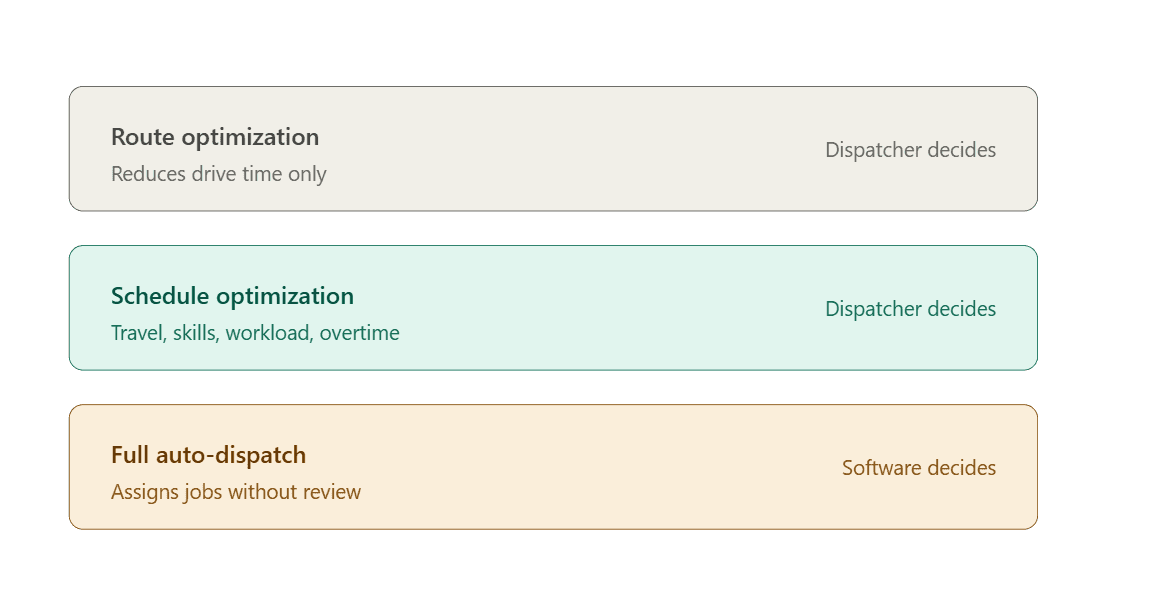
These get marketed interchangeably. They're not the same product and they don't carry the same risk.
What automation is genuinely good at
Evaluating combinations at scale. A person can compare a handful of assignment options; software can compare thousands and surface the best few. Calculating real drive time between stops rather than eyeballing map distance. Flagging overtime exposure before it happens rather than after payroll. Re-optimizing the remaining day in seconds when something changes at 10am.
Automation doesn't require replacing Jobber
A common assumption is that moving away from manual dispatch means migrating to a larger platform - usually one built for companies several times your size, with a price and implementation timeline to match.
That's one option. It's rarely the right one for a 5–20 tech team, because you're replacing a system your crew already knows in order to get one capability you actually need.
The alternative is layering optimization on top of Jobber. Your schedule, customers, and job history stay where they are. Field techs keep working exactly as they do today. Only the dispatcher's workflow changes - they get recommendations alongside the schedule instead of building it unaided.
This is the approach FieldOps Copilot takes: it reads your live Jobber schedule, identifies where drive time and overtime are costing you, and proposes specific changes that write back into Jobber once approved.
How to decide
Before you evaluate any tool, get one number: what is inefficiency currently costing you?
Step 1 - Estimate drive time as a share of paid hours.
Pull a normal week. For each tech, estimate hours spent traveling versus on site. Most teams find it's higher than they expected.
Step 2 - Calculate the loaded cost. Multiply those drive hours by fully loaded hourly cost - wages plus burden plus vehicle and fuel, not just the wage.
Step 3 - Add overtime that wasn't caused by extra work. Overtime from a genuinely busy week is fine. Overtime from a badly sequenced day is waste. Separate them if you can.
Step 4 - Compare against the cost of a solution. Now you have a real number to weigh against software, an extra dispatcher, or doing nothing.
If the number is small, stay manual. That's a legitimate outcome, and worth knowing rather than assuming.
Questions to ask any vendor
Does this recommend changes or apply them automatically?
Can I review before anything changes?
Does it use real drive time or straight-line distance?
Does it account for skills and certifications, or only location?
Can I re-optimize mid-day, or only build the schedule in advance?
Can I undo a change?
What does my field team have to learn?
Does this replace Jobber or work with it?
That last question sorts the market quickly, and it determines whether you're buying a tool or starting a migration.
The short version
Manual dispatch isn't a problem to solve, it's a method with a range. Inside that range it's often better than software, because a good dispatcher carries context no system has.
Outside it, the cost is real but invisible, showing up as overtime and low utilization rather than anything on the dispatch board.
For teams between 5 and 20 techs, the useful question isn't whether to automate. It's whether to keep making dispatch decisions with partial information, or give the person already making them a fuller picture to work from.
Next steps
Want to see where your current Jobber schedule is losing money? Connect your Jobber account and see your first analysis in under 10 minutes.
Running an HVAC team specifically? See how Copilot handles HVAC dispatch.
Frequently Asked Questions
Does Jobber have automated dispatch or route optimization built in?
Jobber provides scheduling, a calendar, a map view, and drag-and-drop assignment, but assignment decisions are made by the dispatcher. It doesn't evaluate combinations of technicians and jobs to find the lowest-cost arrangement. Optimization of that kind comes from a layer added on top of Jobber, not from the core product.
At what team size should I stop dispatching manually?
There's no fixed number. Under 5 technicians, manual dispatch is usually the better choice. Between 5 and 20, it depends on job density, service area size, and how much of your work is reactive rather than recurring. Over 20, most teams have either automated or hired additional dispatchers to keep up.
Will automated dispatch replace my dispatcher?
It depends which type you choose. Full auto-dispatch assigns jobs without human approval. Schedule optimization recommends changes a dispatcher reviews and applies. The second keeps your dispatcher's judgment in the loop - which matters, because knowledge like which technician suits a difficult customer doesn't exist in any system.
What's the difference between route optimization and schedule optimization?
Route optimization only reduces travel by reordering and clustering jobs geographically. Schedule optimization also weighs technician skills, workload balance, overtime exposure, and customer arrival windows. Both are marketed as "optimization," but a routing tool won't stop you from sending the wrong technician to a job.
Do I have to leave Jobber to get automated dispatch?
No. You can migrate to a larger field service platform, but for a 5–20 technician team that usually means replacing a system your crew already knows in order to gain one capability. The alternative is layering optimization on top of Jobber so your data, customers, and field workflow stay unchanged.
Can dispatch be re-optimized mid-day when something changes?
Some tools only build the schedule in advance; others re-optimize the remaining day in seconds. This distinction matters more than most buyers expect, because the schedule built at 6am rarely survives past mid-morning. Ask vendors specifically about intraday re-optimization before you commit.
Will my technicians need to learn a new app?
With a layered tool, generally no - field crews keep working in Jobber exactly as before, and only the dispatcher's workflow changes. With a platform migration, everyone retrains. Ask this question early, because retraining is often the largest hidden cost in a switch.
How much does manual dispatch actually cost my business?
Calculate it rather than estimate it. Take a normal week, work out hours spent driving versus on site, and multiply by fully loaded hourly cost including burden, fuel, and vehicle. Then add overtime caused by poor sequencing rather than genuine workload. That figure is what any solution has to beat.